FR French
BR Portuguese (Brazil)
PL Polish
IT Italian
DE German
US English (US)
ES Spanish

Contact Us

If you still have questions or prefer to get help directly from an agent, please submit a request.
We’ll get back to you as soon as possible.

Please fill out the contact form below and we will reply as soon as possible.

  • Contact Us
  • Submit a Diagnostic Report
German
FR French
BR Portuguese (Brazil)
PL Polish
IT Italian
DE German
US English (US)
ES Spanish
  • Home
  • Hilfe für Artikel

Jobcodes

Mithilfe von Jobcodes können Berater die erfasste Zeit in Tickets kennzeichnen und kategorisieren.

Written by TJ Salyars

Updated at June 10th, 2026

Contact Us

If you still have questions or prefer to get help directly from an agent, please submit a request.
We’ll get back to you as soon as possible.

Please fill out the contact form below and we will reply as soon as possible.

  • Hilfe für Artikel
  • Erste Schritte für Manager
  • Erste Schritte für Berater
+ More
⚠️ Dieser Artikel wurde verschoben

Dieser Artikel wird jetzt hier gepflegt. Bitte verwenden Sie diesen Link und die ExpertConnect-Wissensdatenbank für die aktuellsten Inhalte.

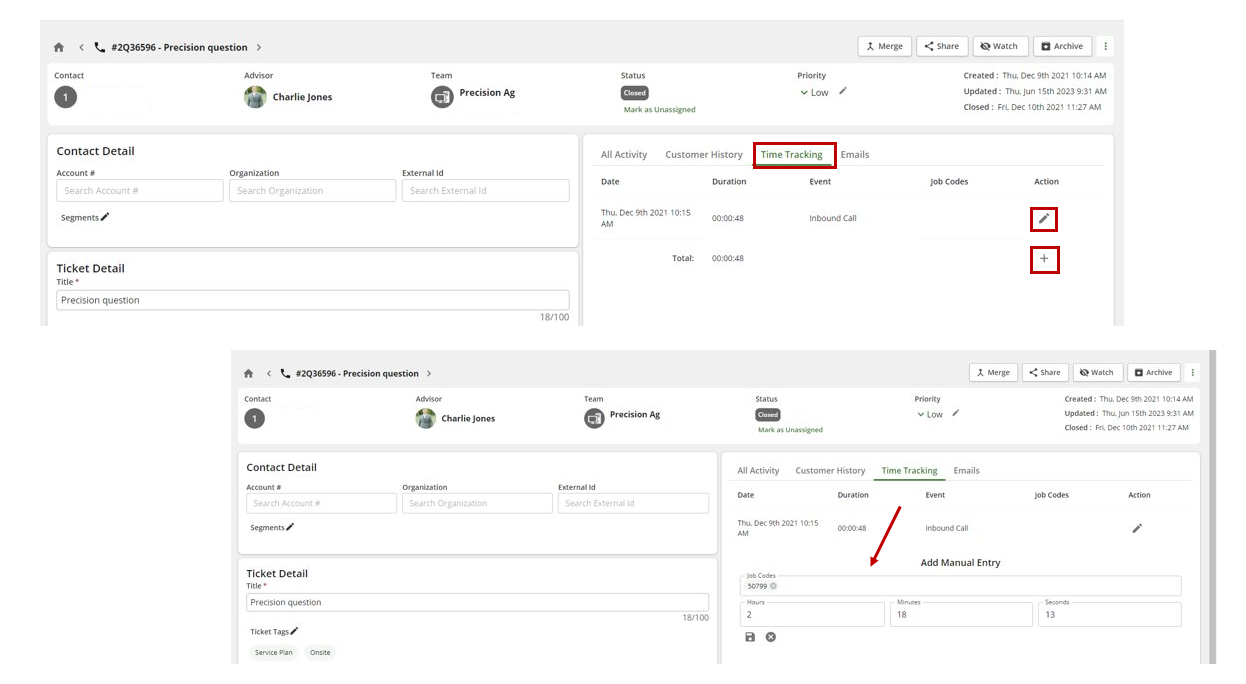
So erstellen Sie einen Jobcode

  1. Klicken Sie in ein Ticket.
  2. Wählen Sie Zeiterfassung und klicken Sie auf das Stift- oder „ + “-Symbol.
  3. Sobald Sie mit der Eingabe eines Jobcodes beginnen, haben Sie die Möglichkeit, ihn als neuen Jobcode hinzuzufügen. Sobald Sie einen neuen Jobcode hinzugefügt haben, können Sie künftig im Abschnitt „Zeiterfassung“ nach jedem anderen Ereignis suchen und ihn auswählen.
Jobcode-Berichte

Wenn Jobcodes für Berichte abgerufen werden, wird der Sitzungstyp angezeigt. Manager können den Unterschied erkennen zwischen:

  • Eingehender Anruf
  • Ausgehender Anruf
  • Videoanruf
  • Manuelle Sitzung

Was this article helpful?

Yes
No
Give feedback about this article

Related Articles

  • EmailHub-Weiterleitung einrichten
  • Externe Berater in Ihrer Organisation
  • Teams erstellen und verwalten
  • Fehlerbehebung bei Firewall- und Netzwerkproblemen
  • Unerwünschte Anrufe (SPAM) blockieren
Feedback

United States
  • Terms and Conditions

Content is protected by copyright. Copying, modifying, or reposting content is prohibited. Copyright © 2023 Deere & Company. All Rights Reserved


Knowledge Base Software powered by Helpjuice

Expand