FR French
BR Portuguese (Brazil)
PL Polish
IT Italian
DE German
US English (US)
ES Spanish

Contact Us

If you still have questions or prefer to get help directly from an agent, please submit a request.
We’ll get back to you as soon as possible.

  • Submit a Diagnostic Report
English (US)
FR French
BR Portuguese (Brazil)
PL Polish
IT Italian
DE German
US English (US)
ES Spanish
  • Home
  • Manage Team Settings
  • VoiceHub Settings

Port Your Google Voice Number

Written by TJ Salyars

Updated at June 25th, 2026

Contact Us

If you still have questions or prefer to get help directly from an agent, please submit a request.
We’ll get back to you as soon as possible.

  • Getting Started for Advisors
  • Getting Started for Managers
  • Ticket Functionality
    Basic Ticket Functionality Advanced Ticket Functionality
  • Contact Management
  • Insights
  • Manage Team Settings
    Team Settings VoiceHub Settings Chat Settings EmailHub Settings WhatsApp
  • Manage Company Settings
  • Admin Page Settings
  • Integrations
  • Mobile App Functionality
  • Best Practices
  • Troubleshooting
  • FAQ's
+ More

Table of Contents

Steps to port your Google Voice number
⚠️ This article has moved

This article is now maintained here. Please refer to this and the ExpertConnect Knowledge Base for the latest content.

Porting a Google Voice number into ExpertConnect is a fairly simple process. To learn more general information about porting a phone number to ExpertConnect, visit Port Your Existing Number into ExpertConnect

Steps to port your Google Voice number

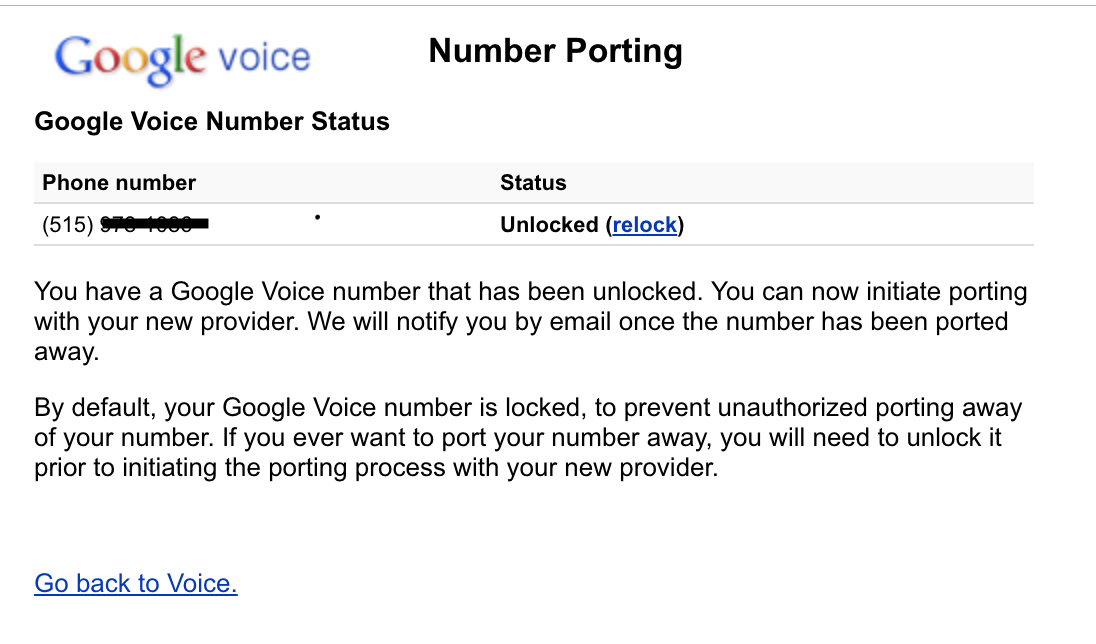
  1. In order to port your Google Voice number, you must unlock the number through your Google account
  2. Take a screenshot of the confirmation page once the number is unlocked.
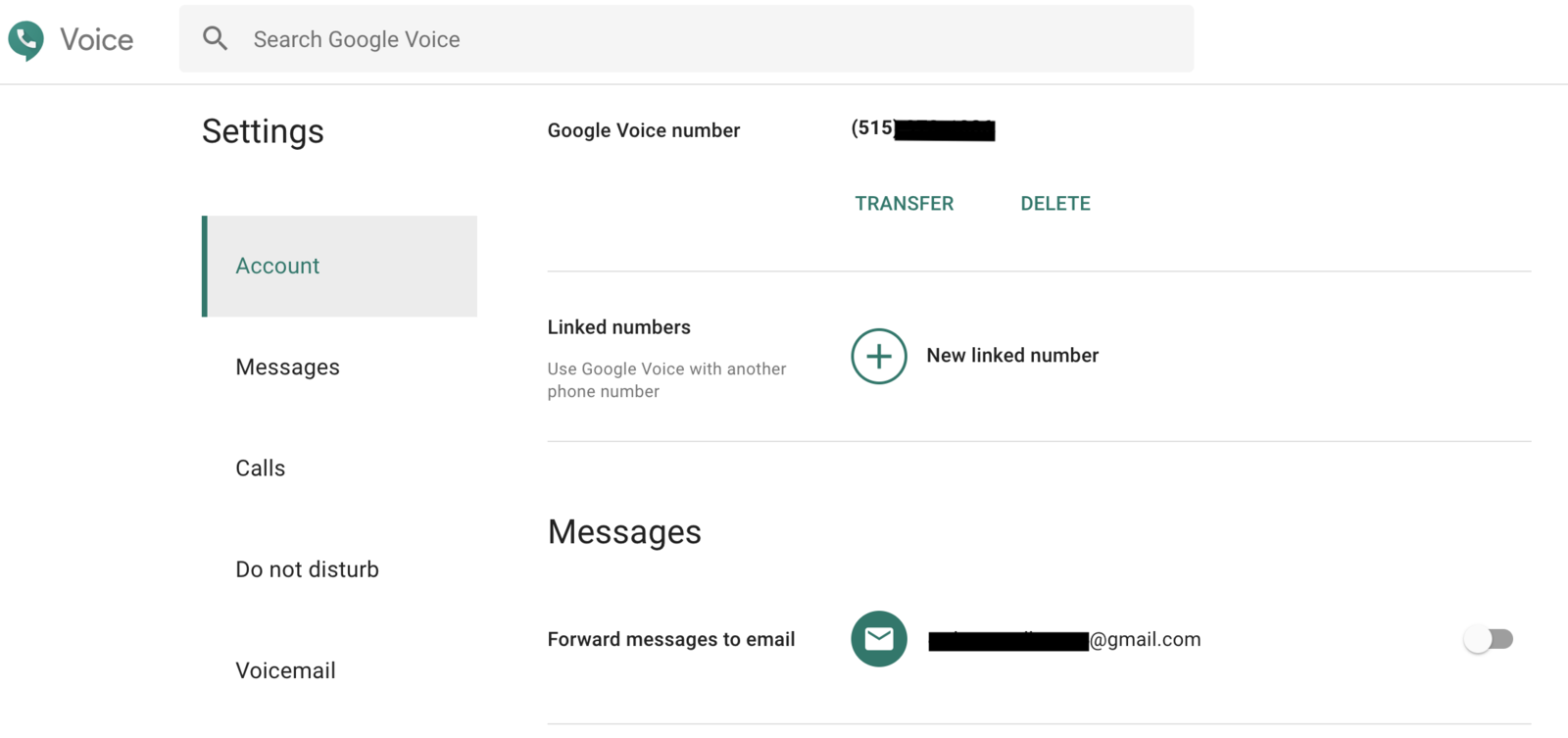
  3. Take a screenshot of your Google Voice settings page that shows your email and the phone number you unlocked.
  4. Complete the following authorization form: Letter of Authorization
  5. Email both screenshots and the completed authorization form to expertconnect@johndeere.com.
  6. The ExpertConnect support team will confirm when your number has been successfully ported into ExpertConnect.
googlevoice transfer

Was this article helpful?

Yes
No
Give feedback about this article

Related Articles

  • Create a Call Tree
  • VoiceHub Settings
  • Creating and Editing Ring Schedules
  • Create a Ticket for Missed Calls
  • Create a Custom Recording
Feedback

United States
  • Terms and Conditions

Content is protected by copyright. Copying, modifying, or reposting content is prohibited. Copyright © 2023 Deere & Company. All Rights Reserved


Knowledge Base Software powered by Helpjuice

Expand